Instant Access
Email and password login loads your full account balance, bonus progress, and game library in one step.
Login at SpinCity in Canada: Quick Account Access
Access your account, bonuses, and 4,000+ games in seconds from any device.
Keep Your Account Safe
What You Should Do
What You Should Avoid
Your Login, Secured
Instant Access
Email and password login loads your full account balance, bonus progress, and game library in one step.
TLS Encryption
Every login request is protected by TLS encryption, with PCI-DSS-compliant payment data stored separately.
All Devices
Sign in from a desktop browser, the mobile site, or the native SpinCity Android and iOS app.
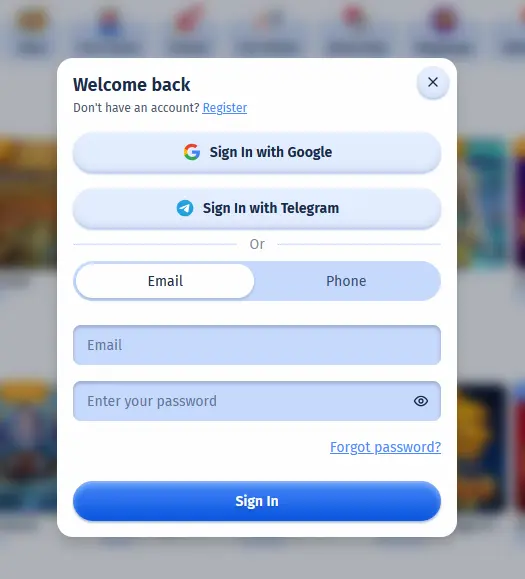
Accessing your SpinCity account takes a single step from any browser or the native app. The process is identical whether you are returning after a short break or logging in for the first time from a new device.
Open your preferred desktop browser and navigate to spincitycasino24.com. Click the orange Login button in the top-right corner of the homepage. In the Welcome Back window, choose Sign In with Google, Sign In with Telegram, or switch to the Email or Phone tab and enter the credentials you used during registration. The eye icon inside the password field lets you confirm what you have typed before submitting. Once authenticated, the platform loads your full dashboard including your CAD balance, active bonus progress, and the complete game catalogue.
On your smartphone, open Safari, Chrome, or any modern browser and go to the SpinCity site. The layout adapts automatically to your screen size. Tap the Login button, which appears at the same position in the top-right corner, enter your credentials, and tap Sign In. All account features including live chat, cashier, and game search are accessible from the mobile browser without any download.
If you have installed the SpinCity native app on your Android or iOS device, tap the app icon to launch it. The login screen appears immediately on launch. Enter your email and password, or use the biometric shortcut (Face ID or fingerprint) if you have enabled it in your device settings after a previous session. The app stores no sensitive data locally; the biometric prompt simply retrieves your securely stored token from the device’s encrypted keychain.
SpinCity supports four ways to sign in: email and password, phone number, Sign In with Google, and Sign In with Telegram. The Google and Telegram options skip the password step entirely by authenticating through your existing account on those services, while the Email and Phone tabs use the credentials or number you registered with. On the native app, biometric authentication (Face ID on compatible iPhones, fingerprint unlock on Android) is available as a convenience shortcut once you have logged in at least once manually and granted the app permission.
The SpinCity platform protects every login with TLS encryption, meaning credentials are transmitted in an encrypted channel and cannot be intercepted in transit. Faro Entertainment N.V. stores payment data under PCI-DSS standards, and the game lobby connects only to game studios whose RNGs are certified by iTech Labs and GLI. Player funds are held in accounts segregated from Faro Entertainment’s operational capital, so your withdrawable balance is independent of the company’s day-to-day finances.
Two-factor authentication is not yet mandatory on SpinCity, which makes password hygiene especially important. Use a password that is unique to this platform and update it if you have any reason to believe it may have been compromised. If you ever notice account activity you did not initiate, contact SpinCity live chat immediately; the 24/7 team has authority to freeze your account and investigate without escalation queues.
The most frequent login issues at SpinCity resolve quickly once you identify the cause.
A wrong password is the most common. Use the Forgot Password link on the login page, enter the email address linked to your account, and a reset link arrives within minutes. If you registered with a different email than the one you are trying, contact [email protected] with your full name and any transaction reference to identify your account.
If your browser is blocking the login redirect, clear the cache and cookies for the SpinCity site, or switch to a different browser. Pop-up blockers and aggressive ad-blocking extensions occasionally interfere with the authentication flow.
Accounts are temporarily locked after several consecutive failed login attempts. This is an automatic fraud-prevention measure. Live chat, available 24/7, can verify your identity and restore access in a single session.
Geographic IP restrictions can sometimes affect login from a VPN. If you are using a virtual private network, disable it and try again from your actual Canadian IP address.
Creating a SpinCity Casino account takes under a minute. Visit the homepage, click the blue Register button, enter an email address and a secure password, confirm your age (19+, or 18+ in Alberta, Manitoba and Quebec), and accept the Terms and Conditions. Your account is created and you are logged in automatically, with the welcome bonus available at the cashier on your first qualifying deposit.
Login Questions Answered
Click Forgot Password on the login page, enter the email address linked to your account, and a secure reset link from SpinCity will arrive within a few minutes. Check your spam folder if it does not appear in your inbox.
Yes. The SpinCity mobile site works in any modern smartphone browser without any installation. Open the site, tap the Login button, and enter your credentials to access your full account including cashier and live chat.
A locked account is usually the cause. After several failed attempts, SpinCity suspends login for security. Contact 24/7 live chat or email [email protected] to verify your identity and unlock access.
No. SpinCity permits one account per player, per household, and per payment method. Duplicate accounts breach the Terms and Conditions and may result in bonus forfeit or account closure.
Back to SpinCity Casino
Grab 100% up to $200 and 100 free spins.
Join the Action Play responsibly: this site is for players aged 18 and over, and every bonus is subject to its own terms.